Computing Workshop
Bill McArthur
Session 8
Topic 1:
Topic 2:
The most popular operating systems (Apple, Linux, and Microsoft Windows) all have a feature which allows for commands to be typed in for execution. For Windows, this is known as a "command window" and it emulates the old Microsoft DOS operating system interface. To open a command window, hit "Start" and then type "command" and hit enter. Bill Gates cobbled together DOS (called MSDOS at one point) from a couple of other operating systems that were in use in the 1970s. This operating system and his version of the programming language BASIC and his marketing of them were his claims to fame and the basis of his fortune. There are a number of functions that can be executed in DOS, including "dir", "help", and "ftp".
There is an Internet function known as "ping" which acts like the SONAR on a ship searching for a submarine. Many web sites have their ping server turned off because of Denial of Service attacks, but you can try "ping rockcreekcomputing.com".
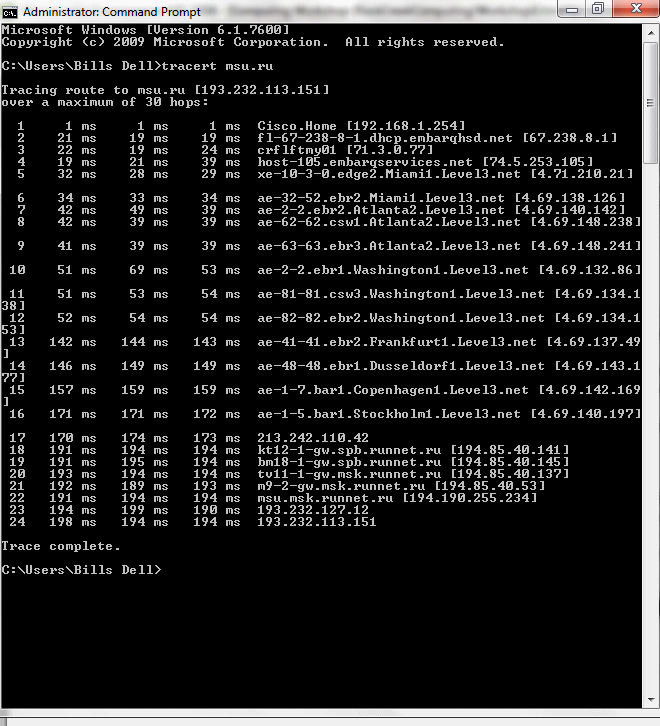
A very interesting Internet function is "traceroute" (in Windows, this is named "tracert") which describes the Internet path from a computer to a web site. Try, in Windows, "tracert rockcreekcomputing.com". Moscow university's web site is "msu.ru". Try ping and tracert for that university. Here is a traceroute when connected to DSL from Century Link.
To find out about your computer's connection to the Internet, use the function "ipconfig" in a command window.
Topic 4:
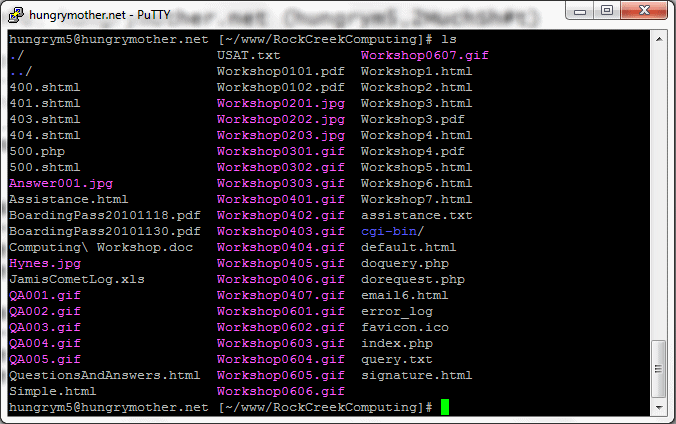
The operating system "UNIX" was developed at Bell Labs in the 1970s. Since then, some version of this operating system has been the favorite on college campuses throughout the world. One of those versions, Linux, developed by a graduate student taking an operating system course, has caught on world-wide and can be found on many servers throughout the world. The windowing for these operating systems is often "x-windows." Here is a screen shot of a "terminal window" into the Linux operating system on the server that hosts RockCreekComputing.com.
Topic 5:
"Blog" is a shortened form of "web log", which is similar to a diary on the Internet. It is quite easy and completely free of charge to start and maintain a blog. There are several blog hosts, but WordPress is currently the best IMHO. To start a blog, browse to www.WordPress.com. I have a blog that I only use for opinions and it's very controversial stuff, not for the faint of heart. I also have a running diary or journal at www.capemaybeach.net.
Topic 6:
You can set up a secure Local Area Network (LAN) in your home by acquiring a wireless router either online or at Best Buy. Your Internet modem will connect to the router and then the router will connect with wires or wireless to your other devices. Here at Rock Creek, we have two laptops, two iPhones, a Blu-Ray DVD player, and a TiVo box connected to our router. You must be sure to set up the wireless part of the router with a password to be secure. You might want to get some help in configuring your router, but then it won't require any further manipulation.
Topic 7:
You will see (and maybe use) these on the Internet: BTW (By The Way), FAQ (Frequently Asked Questions), FYI (For Your Information), GIGO (Garbage In, Garbage Out), GUI (Graphical User Interface), IMHO (In My Humble Opinion), IMO (In My Opinion), LMAO (Laughing My Ass Off), LOL (Laughing Out Loud), KISS (Keep It Simple Stupid), OMG (Oh My God), WYSIWYG (What You See Is What You Get). Common symbols (emoticons) are: :-) (smile) ;-) (wink) :-( (frown)
Topic 8:
You can set up a mini-network, known as a Personal Area Network (PAN), between two devices using the "Bluetooth" technology. The two devices are in a master/slave relationship. Common examples of device pairings are: cell phone and headset, laptop and mouse, and cell phone and GPS for hands-free operation. I use all three of those bluetooth applications. The range for a bluetooth pairing varies from 3 to 300 feet, depending on the devices.